
1. Understanding Google Play's Dual Account Deletion Mandate
If your Android app allows users to register an account—whether via email/password, Phone OTP, Google Sign-In, or OAuth—Google Play's **Account Deletion Policy** enforces two non-negotiable surfaces before your Closed Testing release can pass review. First, users must find a readily discoverable **Delete account** action inside the app itself (for example, `Profile > Settings > Delete Account`). Second, you must submit a dedicated **Web Account Deletion URL** inside **App content > Data safety**.
Why does Google require a web link when you already built an in-app Delete button? Consider a user who uninstalled your app three months ago and wants their stored profile purged without re-downloading a 90 MB binary. Telling users on your web page *'Please reinstall our Android app and open Settings to delete your account'* is an explicit policy violation that triggers immediate rejection!
| Rejected URL Pattern | Why Google's Audit Rejects It | Compliant Fix |
|---|---|---|
| Google Drive / Docs with private ACL | Returns HTTP 401/302 login wall to Play crawler | Deploy static HTML on Cloudflare Pages or GitHub Pages |
| Generic privacy page missing app name | Fails entity linkage check against Store Listing | Name exact App Title, package, and developer@example.com |
| Web page saying 'Delete inside the app' | Violates uninstalled-user web deletion rule | Offer web OTP self-serve form or verified email request |
| Silent third-party SDK omission | Crashlytics / AdMob bytecode contradicts text | Disclose analytics, crash logs, and Advertising ID |
2. Drop-In Semantic HTML Blueprint for Free Cloudflare / GitHub Pages Hosting
You do not need paid privacy-generator subscriptions that inject tracking scripts or break over time. A clean, zero-JS semantic HTML page hosted on Cloudflare Pages (`https://example.com/delete-account`) or GitHub Pages loads in under 50 milliseconds over TLS 1.3 and passes Play Console crawler checks reliably.
Ensure your page includes four mandatory elements: **(1)** your exact Play Store app name and developer name, **(2)** clear numbered steps for requesting or executing web deletion (e.g., via web login or emailing `developer@example.com` from the registered address), **(3)** exact data types deleted immediately/within 30 days, and **(4)** any legally retained records with explicit retention timeframes.
<!doctype html>
<html lang="en">
<head>
<meta charset="utf-8" />
<title>Delete Account & Data — HabitPulse Android App</title>
</head>
<body>
<main>
<h1>Account & Personal Data Deletion — HabitPulse</h1>
<p>Published by Example Indie Labs (Contact: developer@example.com)</p>
<h2>How to Delete Your Account Without the App Installed</h2>
<ol>
<li>Submit your registered email via our web verification form, or email developer@example.com with subject "Delete HabitPulse Account".</li>
<li>Confirm the one-time verification code sent to your registered address.</li>
<li>Your account credentials, cloud habit logs, and push tokens are permanently purged within 7 days.</li>
</ol>
<h2>Data Retention Disclosure</h2>
<p>Deleted within 7 days: Email address, profile settings, synced user records. Retained: Anonymized aggregate crash counts and statutory Play Billing tax receipts (retained for 7 years per tax law, stripped of profile login access).</p>
</main>
</body>
</html>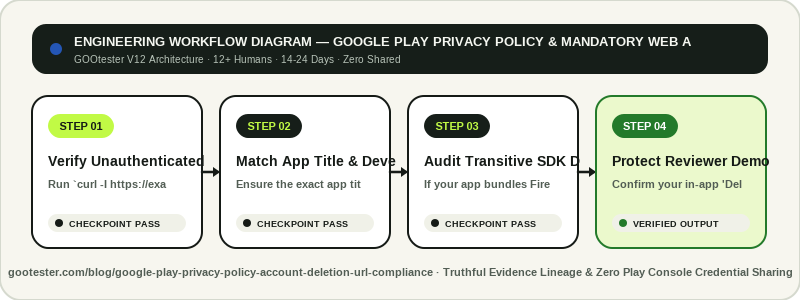
3. 4 Pre-Submission Audits Linking Bytecode, Data Safety & Privacy URLs
Google Play's static analyzer scans the compiled classes inside your `.aab` (`com.google.firebase.crashlytics`, `com.google.android.gms.ads`, `com.revenuecat.purchases`) and cross-checks those SDK signatures against both your **Data safety** questionnaire and your hosted **Privacy Policy URL**.
Run these four verification steps before submitting your Closed Testing track for initial review.
- Verify Unauthenticated HTTP 200 via curl: Run `curl -I https://example.com/privacy` and `curl -I https://example.com/delete-account` in an incognito shell to confirm direct `200 OK` HTTPS responses.
- Match App Title & Developer Contact Character-for-Character: Ensure the exact app title entered in Main Store Listing and your verified support email (`developer@example.com`) appear prominently in plain HTML text.
- Audit Transitive SDK Data Collection: If your app bundles Firebase Crashlytics, Sentry, or AdMob, check 'Yes' to Data Collection in Data Safety (Crash logs / Device IDs) even if your own backend stores zero PII.
- Protect Reviewer Demo Login During Deletion QA: Confirm your in-app 'Delete Account' button clears user data with a confirmation modal while resetting (not bricking) `reviewer-demo@example.com`.
4. What If Your App Stores Everything Locally With Zero Accounts?
If your app is a 100% offline SQLite/Room utility that never creates user accounts and never syncs personal profiles to a server, select *My app does not allow users to create an account* inside the Data Safety form—no Web Account Deletion URL is required, though a valid HTTPS **Privacy Policy URL** is still mandatory for every app on Google Play!
Getting both URLs right before Day 1 means your Closed Testing release clears Google review smoothly so `testers@gootester.com` can opt in immediately. Remember: GOOtester's 14-day ($6 Basic), 16-day ($12 Standard + ADB QA), and 24-day ($20 Premium + ADB QA) clocks start only after your Closed Testing track setup is verified live.
- Never use URL shorteners (`bit.ly`, `tinyurl`) in Play Console Privacy Policy or Deletion URL fields.
- Keep TLS certificates auto-renewed via Cloudflare or GitHub Pages—expired HTTPS certs trigger post-launch policy warnings.
- Include an 'Effective Date: YYYY-MM-DD' header on your Privacy Policy page.
- Enter your Privacy Policy URL inside **App content > Privacy policy** before uploading your first `.aab`.
Actionable Pre-Submission Verification Checklist
- Host dedicated `/privacy` and `/delete-account` static HTML pages over public HTTPS (`HTTP 200`).
- Include your exact Google Play Store Listing app title, developer name, and `developer@example.com` contact.
- Ensure uninstalled users can complete or request account deletion on the web without reinstalling your app.
- Specify exact deleted data categories, completion SLA (e.g., <= 30 days), and any legally retained records.
- Build a clear in-app `Settings > Delete Account` button with an explicit confirmation dialog.
- Cross-check bundled SDKs (Crashlytics, AdMob, Billing) against your Data Safety form answers.
Frequently Asked Questions
Can my Web Account Deletion URL just be an anchor link (#deletion) inside my Privacy Policy?
While a direct `#account-deletion` section with a functional request mechanism can work if prominently rendered, hosting a dedicated `/delete-account` URL with clear step-by-step instructions and a verification form or mailto flow is much less likely to be misread by reviewers.
Does 'Sign in with Google' count as creating an account in my app?
Yes! If signing in with Google creates a user record, UID, or cloud-synced state on your backend or Firebase Authentication project, Google Play classifies that as account creation requiring both in-app and web deletion.
Am I required to automate instant self-serve web deletion, or is verified email deletion allowed?
Verified email-based or web-form deletion requests are compliant provided the web page clearly explains how the user submits the request, verifies ownership without reinstalling the app, and states the deletion timeline.
Do apps in Closed Testing already need a live Privacy Policy and Account Deletion URL?
Yes. Play Console requires completing App Content declarations—including Privacy Policy and Data Safety Account Deletion links—before approving your initial Closed Testing release.