
1. Why Passwordless SMS, Magic Links & OAuth Break Google Play Review
Modern AI-assisted and cross-platform Android apps love passwordless authentication: Firebase Phone Auth SMS codes, Supabase/Resend email magic links, or single-button Google Sign-In (`androidx.credentials:credentials`). Unfortunately, **Policy and programs > App content > App access** was designed around reusable username/password pairs that multiple automated crawlers and human reviewers across global time zones can enter repeatedly without human coordination.
When developers either falsely select *All functionality is available without special access* on a login-gated app—or paste their personal phone number expecting Google to text them at 03:00 UTC—Play Console halts the release with an **App Access: Invalid or incomplete login credentials** rejection. That rejection freezes both initial Closed Testing track approval and Day-15 Production Access reviews.
| Auth Mechanism | Why Raw Flow Fails Review | Compliant Engineering Solution | App Access Form Format |
|---|---|---|---|
| Phone SMS OTP | Reviewer cannot receive live SMS; country-code locks | Firebase/Supabase test phone + static 6-digit OTP | Phone: +16505553434 / OTP: 482910 |
| Email Magic Link | Reviewer cannot open external email inbox link | Add 6-digit Email OTP fallback with static demo code | Email: reviewer-demo@example.com / Code: 739204 |
| Google Sign-In Only | SHA-1 mismatch or enterprise-managed reviewer device | Verify Play Signing SHA-1 + provide Email/Password demo | Demo login button or email fallback |
| Geo-Fenced / Invite-Only | Reviewer IP outside target city or missing invite code | Pre-seed reviewer account with global geo-bypass flag | Reusable invite + pre-populated account |
2. Implementing Server-Scoped Demo OTPs Without Client-Side Backdoors
Security rule number one: **never** write `if (email == "reviewer-demo@example.com") navigateToHome()` inside your Android client code! Anyone downloading your APK can decompile DEX bytecode with `jadx` in ten seconds and impersonate that check locally. Instead, handle reviewer authentication inside your backend or managed identity provider so the server issues a genuine, scoped JWT session (`gt_live_example_token_12345`).
In Firebase Authentication, open **Authentication > Sign-in method > Phone > Phone numbers for testing** and register an E.164 RFC-reserved test number (for example, `+1 650-555-3434`) mapped to a static 6-digit verification code. For custom or email-OTP backends, bind a high-entropy static OTP secret in server environment variables restricted exclusively to `reviewer-demo@example.com`, and seed that account with realistic sample data so reviewers never land on blank empty states.
// Server-side OTP verification (Cloudflare Worker / Node API)
export async function verifyEmailOtp(email: string, submittedCode: string, env: Env) {
  const normalized = email.trim().toLowerCase();

  // Dedicated Google Play App Access demo account (constant-time check, non-destructive scope)
  if (normalized === "reviewer-demo@example.com" && env.PLAY_REVIEWER_STATIC_OTP) {
    if (timingSafeEqualStr(submittedCode, env.PLAY_REVIEWER_STATIC_OTP)) {
      return issueDemoSessionToken({
        sub: "usr_play_reviewer_demo",
        sampleTokenExample: "gt_live_example_token_12345",
        readOnlyBilling: true
      });
    }
  }

  return verifyStandardOneTimeCode(normalized, submittedCode, env.DB);
}
3. 4 Checks That Prevent 'Credentials Did Not Work' False Rejections
Even when developers configure a valid test phone number, subtle UI assumptions still break reviewer logins—most famously country-code dropdowns that auto-lock to the device's SIM carrier country or rate limiters that lock `reviewer-demo@example.com` after five automated Pre-Launch Report crawler attempts.
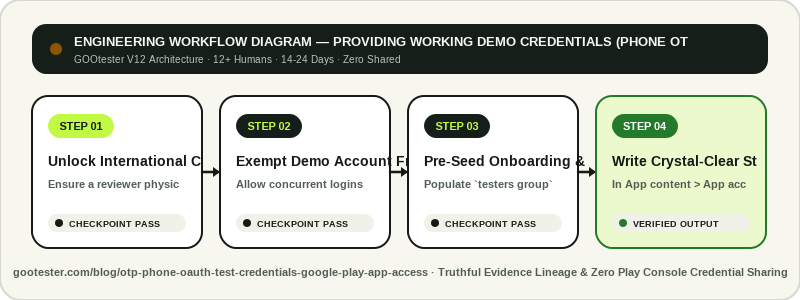
Walk through these four verification steps on a clean handset over cellular data (or non-home network) before submitting your release.
- Unlock International Country Prefix Selection: Ensure a reviewer physically located in the US, Ireland, India, or Singapore can manually select `+1` (or type full `+16505553434`) regardless of SIM locale.
- Exempt Demo Account From Lockouts & Single-Session Eviction: Allow concurrent logins on `reviewer-demo@example.com` and disable 5-attempt brute-force lockouts that Pre-Launch Report Robo crawlers might trip.
- Pre-Seed Onboarding & Sample Content: Populate `reviewer-demo@example.com` with realistic sample entries and ensure Account Deletion does not permanently brick the reviewer demo login.
- Write Crystal-Clear Step-by-Step Console Instructions: In App content > App access, specify exact tap labels: '1. Tap Continue with Email -> 2. Enter reviewer-demo@example.com -> 3. Enter static code'.
4. Keeping App Access Credentials Alive Permanently Post-Approval
A classic Day-16 heartbreak occurs when a developer creates a temporary demo login to pass Closed Testing review on Day 0, deletes or rotates the demo user during week two of development, and then gets rejected during Day-15 Production Access review because the stored **App access** credentials now return `401 Unauthorized`.
Treat your Play Console **App access** credentials as permanent production infrastructure: every future `versionCode` hotfix and Store Listing update can re-trigger automated or manual login verification. Meanwhile, let real human testers in your GOOtester cohort ($6 Basic 12 testers, $12 Standard 15 testers + ADB QA, $20 Premium 25 testers + ADB QA) test your normal public sign-up flow via `testers@gootester.com` so both reviewer paths and real user paths are battle-tested.
- Verify Google Sign-In works with Play App Signing's SHA-1 certificate, not just your local debug key.
- Never paste magic-link inbox passwords for external mail providers into Play Console.
- Test your exact App Access instructions verbatim on a freshly wiped physical Android device.
- Update App Access instructions immediately before rotating any backend reviewer OTP secret.
Actionable Pre-Submission Verification Checklist
- Declare restricted login screens honestly under Policy and programs > App content > App access.
- Configure a server-side fictional phone OTP or static email OTP for `reviewer-demo@example.com`.
- Ensure country-code pickers allow selecting your test phone prefix from any global region.
- Allow concurrent sessions on `reviewer-demo@example.com` and prevent Delete Account from destroying the login.
- Register Google Play App Signing's SHA-1 certificate in Firebase / Google Cloud Console for OAuth.
- Keep App Access credentials active continuously through Closed Testing, Production review, and future updates.
Frequently Asked Questions
My app only uses 'Continue with Google'—do I still need App Access credentials?
Yes! Reviewers often test on managed devices where arbitrary personal Google Sign-In is restricted or prefer explicit test credentials. Register your Play App Signing SHA-1 and provide a simple Email/OTP fallback credential (`reviewer-demo@example.com`) in App Access.
How can I give Google Play a static password if my app only sends Email Magic Links?
Add a 'Have a 6-digit login code?' input on the magic-link waiting screen. Normal users click their email link or enter a dynamic OTP, while `reviewer-demo@example.com` accepts a server-verified static 6-digit code.
Should I share reviewer-demo@example.com with my 12 Closed Testing testers?
Keep `reviewer-demo@example.com` dedicated to Play Console App Access (or read-only demo exploration) while allowing human closed testers to sign up normally so you validate real onboarding conversion and edge cases.
Why did my app get rejected when the test phone OTP worked on my own phone?
Nine times out of ten, the phone input widget auto-detected the reviewer's local country code and prevented entering your test number's country prefix, or a geo-IP firewall blocked non-domestic login requests.