
1. Why 'Start Rollout to Closed Testing' Is Greyed Out (Dependency Map)
First-time Play Console builders routinely upload an `.aab` into **Testing > Closed testing**, write release notes, and discover **Next / Start rollout** is disabled with a wall of red warnings pointing to **App content** and **Dashboard** setup tasks. Worse, clicking random items inside **App content** displays *'Complete Privacy policy and Content rating first'*.
Save forty-five minutes of tab-hopping by executing all App Content declarations in this exact top-to-bottom dependency sequence.
| Order & Form Name | Unlocks / Depends On | Safe Default / Critical Rule for Indie Apps |
|---|---|---|
| 1. Privacy policy | Prerequisite for Target Audience | Live HTTPS URL (`https://example.com/privacy`) naming exact app & entity |
| 2. App access | Prerequisite for Reviewer QA | Provide working `reviewer@example.com` login + static OTP if auth exists |
| 3. Ads | Prerequisite for Target Audience | Check 'Yes' if ANY ad SDK exists in manifest, even if currently hidden |
| 4. Content rating (IARC) | Prerequisite for Target Audience | Use monitored `dev@example.com`; answer violence/UGC/purchases truthfully |
| 5. Target audience & content | Requires #1, #2, #3, #4 complete | Select `18 and over` unless built for Families Policy SDK rules! |
| 6. News & 7. Government apps | Independent binary attestations | Select 'No' unless you are a verified news agency or state authority |
| 8. Financial features | Mandatory for 100% of apps | Check 'My app doesn't provide any financial features' if non-finance |
| 9. Health apps | Mandatory for 100% of apps | Check 'My app does not have any health features' if non-health |
| 10. Data safety | Requires Privacy Policy + Account URL | Match every SDK data type + paste Account Deletion URL if auth exists |
| 11. Advertising ID | Triggered by `.aab` / API 33+ | Match `com.google.android.gms.permission.AD_ID` in merged manifest |
| 12. Conditional Manifest Forms | Triggered AFTER draft `.aab` upload | Foreground Service video, Child Safety (Social/Dating), Health Connect |
2. Inspect Your Merged `AndroidManifest.xml` Before Answering Forms #10–#12
Half of all Day-0 Closed Testing rejections happen because a developer answers *'No, my app does not use Advertising ID'* or leaves Photo/Video blank, unaware that Firebase Analytics, Expo, Unity, or an older image-picker plugin silently merged `AD_ID` or `READ_MEDIA_IMAGES` into the final `.aab`!
Always upload your signed `.aab` as an **unsubmitted draft** first so Play Console detects manifest permissions immediately—and inspect your merged manifest locally so unwanted permissions are stripped via `tools:node="remove"` before submitting declarations.
<manifest xmlns:android="http://schemas.android.com/apk/res/android"
    xmlns:tools="http://schemas.android.com/tools">

    <!-- Strip transitive permissions injected by SDKs if your app does NOT use them: -->
    <uses-permission
        android:name="com.google.android.gms.permission.AD_ID"
        tools:node="remove" />

    <!-- Use Android Photo Picker instead of broad READ_MEDIA_IMAGES / READ_MEDIA_VIDEO! -->
    <uses-permission android:name="android.permission.READ_MEDIA_IMAGES" tools:node="remove" />
    <uses-permission android:name="android.permission.READ_MEDIA_VIDEO" tools:node="remove" />
</manifest>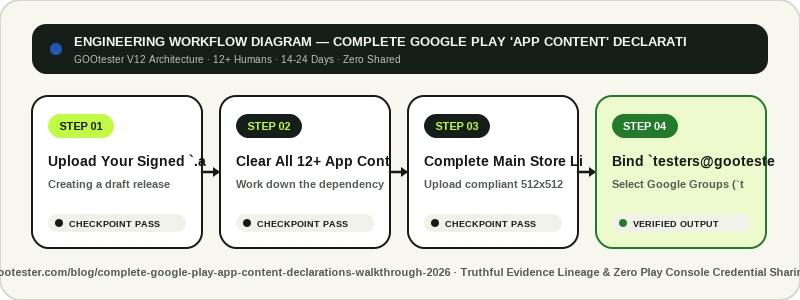
3. 4-Step Sequence From Zero 'Needs Attention' Tasks to Live Closed Testing
Clearing **App content** alone is still one step shy of a working Closed Testing track—Play Console also requires a valid **Main store listing** (icon, feature graphic, phone screenshots, descriptions, category, and `support@example.com`) plus Closed Testing **Countries**.
- Upload Your Signed `.aab` as a Draft on Closed Testing First: Creating a draft release causes Play Console to parse your `.aab` manifest and populate every conditional declaration under App content.
- Clear All 12+ App Content Forms Until 'Needs Attention (0)': Work down the dependency table above until every single item moves from *Needs attention* into the **Submitted** tab.
- Complete Main Store Listing & Closed Testing Countries: Upload compliant 512x512 icon, 1024x500 feature graphic, and real phone UI screenshots, then add all 170+ countries inside Closed Testing.
- Bind `testers@gootester.com` & Submit Release for Initial Review: Select Google Groups (`testers@gootester.com`), click Save, roll out your Closed Testing release, and publish any queued items in Publishing Overview.
4. The 3 Silent App Content Time Bombs (`13+`, `READ_MEDIA_IMAGES` & Auth)
Watch out for three classic traps: **Trap #1** is checking `13–15` and `16–17` in Target Audience 'to get a bigger market'—doing so subjects your app to child-directed ad SDK restrictions and blocks non-certified analytics. **Trap #2** is leaving legacy `READ_MEDIA_IMAGES` / `READ_MEDIA_VIDEO` in a profile-avatar picker instead of migrating to the zero-permission **Android Photo Picker (`PickVisualMedia`)**, triggering Google's strict Photo and Video Permissions rejection. **Trap #3** is offering in-app account sign-up without pasting a live web **Account Deletion URL** inside Data Safety.
Once your initial Closed Testing release passes Google's review and reaches `Available to testers`, GOOtester verifies your setup and starts your 14-day ($6 Basic), 16-day ($12 Standard), or 24-day ($20 Premium) human testing window—keeping our automated ARM64 physical-device ADB QA ($12 Standard / $20 Premium) strictly separate from human Play Store opt-ins. Google Play alone decides policy compliance and Production Access.
- Verify your Privacy Policy URL and Account Deletion URL load with HTTP `200 OK` in an incognito browser tab.
- Check **Publishing overview** after editing App Content—if Managed Publishing is on, policy form updates sit unpublished until you click Publish!
- Keep a copy of your Data Safety exported `.csv` in Git so future SDK updates stay documented.
- Re-check **App content** every time you add a new Gradle/npm/pub.dev dependency during Closed Testing.
Actionable Pre-Submission Verification Checklist
- Upload your signed `.aab` as a draft first so Play Console surfaces all manifest-triggered declarations.
- Complete Privacy Policy, App Access, Ads, and IARC Content Rating first to unlock Target Audience.
- Select `18 and over` in Target Audience unless your app intentionally complies with Families Policy rules.
- Submit mandatory 'No / Does not have' answers for Government, News, Financial Features, and Health Apps if inapplicable.
- Strip unused `AD_ID` and `READ_MEDIA_IMAGES`/`VIDEO` permissions (use Android Photo Picker for one-off uploads).
- Confirm App Content shows `Needs attention (0)` and Publishing Overview is clear before inviting `testers@gootester.com`.
Frequently Asked Questions
Do I really have to fill out all 12+ App Content forms just to run Closed Testing?
Yes. Unlike Internal Testing (which skips store-wide review for up to 100 internal testers), Closed Testing distributes externally via Play Store opt-in links and requires completing all mandatory App Content declarations and Store Listing assets before rollout.
Why is 'Target audience and content' greyed out in my Play Console App Content list?
Play Console locks Target Audience until you complete and save Privacy Policy, App Access, Ads, and Content Rating (IARC). Finish those four prerequisites first and Target Audience unlocks immediately.
Why did Google reject my app for `READ_MEDIA_IMAGES` when users only upload a profile picture?
Under Google Play's Photo and Video Permissions policy, broad gallery access (`READ_MEDIA_IMAGES` / `READ_MEDIA_VIDEO`) is restricted to apps whose core purpose requires persistent library management (like gallery editors or backup apps). One-time avatar or receipt uploads must use the system Android Photo Picker.
If I fix a rejected App Content declaration, does it reset an already-running 14-day closed test?
Updating an App Content form does not erase prior opted-in days on an active track; however, initial rejections *before* your first release goes live block testers from opting in at all—which is why GOOtester verifies setup before starting your 14-day clock.