2. 5 Play Console Traps That Block Testers From Clicking 'Become a Tester'
What if real people *did* open your opt-in URL, yet either saw `'App not available for this account'` or your dashboard stayed frozen at zero 36 hours later? In 95% of support audits, one of five Play Console state traps prevented your track configuration from going live on Google's edge servers.
Walk through your Play Console tabs and verify every item in this configuration state check before sharing your opt-in URL.
[CHECK 1] Closed testing > Track summary: Status == "Available to testers"
[CHECK 2] Closed testing > Countries: Select All 170+ countries/regions explicitly
[CHECK 3] Closed testing > Testers: (o) Google Groups -> testers@gootester.com [Saved]
[CHECK 4] Publishing overview: Managed publishing / pending review queue is EMPTY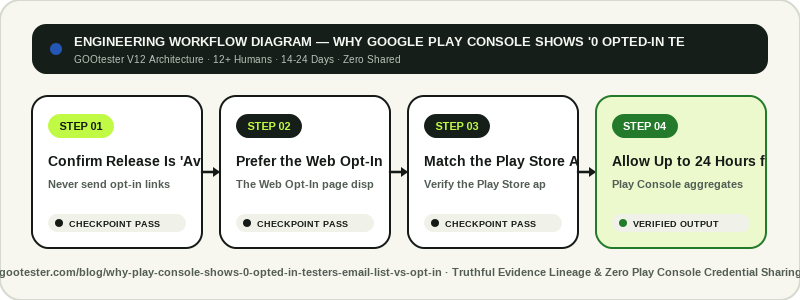
3. Fixing the Classic 'Opted In on Laptop, 404 on Phone' Account Mismatch
Even when your Play Console configuration is 100% live, testers frequently keep two or three Google accounts signed into their Android phone (`personal@example.com`, `work@example.com`). If Chrome opens the Web Opt-In URL under Account A, they click **Become a tester**, and Chrome hands off to the Play Store app—which has Account B selected in the top-right avatar—the Play Store shows **Item not found** or fails to link the install!
Follow this four-step sequence whenever onboarding testers (or let GOOtester's coordinated human workflow handle it).
- Confirm Release Is 'Available to Testers' & Publishing Overview Is Clear: Never send opt-in links while your `.aab` is in initial review or held inside Managed Publishing.
- Prefer the Web Opt-In Link (`https://play.google.com/apps/testing/<pkg>`): The Web Opt-In page displays the signed-in email at the top so testers spot wrong-account logins immediately.
- Match the Play Store App Avatar Before Tapping Install: Verify the Play Store app's top-right avatar matches the exact Google account that joined `testers@gootester.com`.
- Allow Up to 24 Hours for Play Console Batch Counter Sync: Play Console aggregates opt-in and install statistics on daily batch jobs—avoid panic-editing your track while metrics sync.
4. Why GOOtester Verifies Track Setup Before Starting Your 14-Day Clock
Many developers lose three to five days of paid or volunteer testing because they invite testers the minute they upload an `.aab`, before Google finishes reviewing the initial Closed Testing release or before uncommitted Country edits are published. Testers click a dead link, give up, and never come back.
At GOOtester, our service clock **never** starts at checkout. After you bind `testers@gootester.com` via Google Groups, we verify your Closed Testing track and opt-in URL resolve cleanly first; only then do our 12 ($6 Basic), 15 ($12 Standard), or 25 ($20 Premium) real consented human testers opt in and install on physical smartphones—while automated ARM64 ADB QA ($12 Standard / $20 Premium) runs strictly separately to inspect crashes and ANRs. Google Play alone decides Production Access.
- Never delete and recreate your Closed Testing release just to 'refresh' the opted-in counter—wait out the normal 12–24h Play Console telemetry lag.
- Check **Statistics > Closed testing > Installed audience** alongside the Dashboard summary widget.
- Ensure paid apps are either free during Closed Testing or redeemed via Promo Codes so price tags don't block Stage 3 installs.
- Keep a 15- or 25-tester buffer so one user's account switch never drops your active opted-in count below 12.
Actionable Pre-Submission Verification Checklist
- Verify Closed Testing track status shows green 'Available to testers' rather than 'In review'.
- Confirm all 170+ countries/regions are added directly inside your Closed Testing track.
- Ensure Google Groups radio button is selected with `testers@gootester.com` saved.
- Open Publishing Overview and publish any queued changes stuck under Managed Publishing.
- Verify testers opt in and install using the exact same Google account in both browser and Play Store app.
- Wait 12–24 hours after human opt-ins complete for Play Console's batch statistics counter to refresh.
Frequently Asked Questions
If a Google Group has 50 members, why doesn't Play Console immediately show 50 opted-in testers?
Adding a Google Group only grants those 50 members permission to view and join your closed test. Play Console counts a member as an 'opted-in tester' only after that individual opens your opt-in URL and clicks 'Become a tester'.
How long does Play Console take to update from 0 opted-in testers after 15 people opt in?
Play Console's Closed Testing dashboard counter and consecutive-day tracker update asynchronously on Google's daily reporting schedule, typically appearing within 4 to 24 hours after testers accept the opt-in and install.
Does clicking 'Become a tester' on a desktop browser without installing on a phone pass Production review?
While clicking 'Become a tester' increments the raw opt-in counter, having zero real Android device installs and zero app sessions across 14 days almost guarantees a 'More testing required' rejection during manual Production Access review.
Can I use both an Email List for my co-founder and a Google Group on the same track?
Play Console uses a mutually exclusive radio toggle between Email Lists and Google Groups on a single track. Either add your co-founder's test check via Internal Testing (instant rollout) or create a secondary closed track while keeping `testers@gootester.com` untouched on your primary track.