2. Why Logging Into Play Console Fails—And 'Hello World' Uploads Backfire
Two dangerous myths circulate on developer forums whenever dormancy warnings go out. Myth #1 claims that signing into `play.google.com/console` once a month resets the inactivity clock. **It does not.** Play Console's automated dormancy evaluator tracks *verified account state* and *published binary/store lifecycle events*, ignoring passive page views.
Myth #2 is far worse: panicked developers compile a blank Android Studio template titled `'My Test App 123'`, paste Lorem Ipsum into the Store Listing, and submit it 48 hours before closure. Because Google Play's Minimum Functionality and Broken Functionality policies forbid empty placeholder apps even on testing tracks, that panic upload triggers policy rejections! Honestly, letting an unready dormant account close cleanly—and paying `$25` for a fresh account when your real app is ready—is vastly safer than accumulating policy strikes.
// Healthy annual maintenance release for existing indie apps to prevent dormancy & SDK decay
android {
    namespace = "com.example.indieutility"
    compileSdk = 36

    defaultConfig {
        applicationId = "com.example.indieutility"
        minSdk = 26
        targetSdk = 36
        versionCode = 14 // Increment versionCode for annual API 36 + dependency refresh
        versionName = "1.4.0"
    }
}
4. Graduating Your Rescued Account All the Way to Production
Once your functional MVP passes Google's initial Closed Testing review (`Available to testers`), complete the full graduation journey rather than leaving the app abandoned in pre-production for another year. Bind `testers@gootester.com` via Google Groups and run a structured 14-day closed test so you can unlock public Production distribution.
With GOOtester's one-time per-app tiers—Basic ($6 for 12 testers / 14 days), Standard ($12 for 15 testers / 16 days + standalone ARM64 ADB QA), or Premium ($20 for 25 testers / 24 days + standalone ARM64 ADB QA)—your clock starts only after Closed Testing track setup is verified, helping you collect real bug feedback for your Production Access submission.
- Register a new Play Console account only when your MVP is within 30–60 days of Closed Testing readiness.
- Set a calendar reminder every August to ship an annual `targetSdk` maintenance update on published apps.
- Keep `developer@example.com` notifications whitelisted so 60-day closure warnings never land in spam.
- Never buy aged 'pre-2023 Play Console accounts' from third-party sellers—transferred gray-market accounts get banned.
Actionable Pre-Submission Verification Checklist
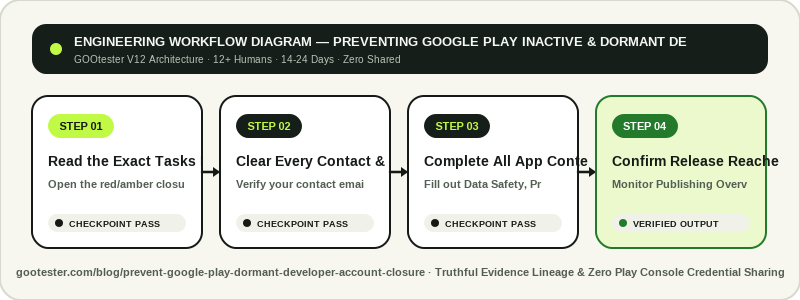
- Inspect the exact remediation checklist inside your Play Console Account Details closure banner.
- Complete pending Identity, Address, Phone OTP, and EU DSA declarations immediately.
- Submit your real signed `.aab` at least 10–14 days before the closure date to allow for review time.
- Never upload blank templates or broken WebViews that violate Minimum Functionality policy.
- Confirm Publishing Overview shows your release approved and the closure warning cleared.
- Schedule annual `targetSdk` and library refreshes for low-install niche utilities so accounts stay active.
Frequently Asked Questions
If Google closes my account for inactivity, am I banned from Google Play forever?
No! Dormant account closure is purely for inactivity, not a policy violation. While the original $25 registration fee is non-refundable and that account cannot be reopened, you are completely allowed to create a new Play Console account later.
Does publishing an app to Internal or Closed Testing stop dormant account closure?
Check the exact wording in your Play Console closure banner: for new unused accounts, completing identity verification and publishing a policy-approved release on Internal, Closed, or Production before the deadline typically satisfies the active-publishing check—provided it passes review in time.
Why didn't logging into Play Console yesterday remove the closure warning?
Google Play does not count dashboard web logins as developer activity. You must complete verification and publish or update a compliant app binary before the deadline.
Should I buy an old 2021 Play Console account online to avoid dormancy and the 12-tester rule?
Never. Buying third-party Play Console accounts violates the Developer Distribution Agreement and triggers permanent Associated Developer Account terminations when payment profiles and IP/device fingerprints change.