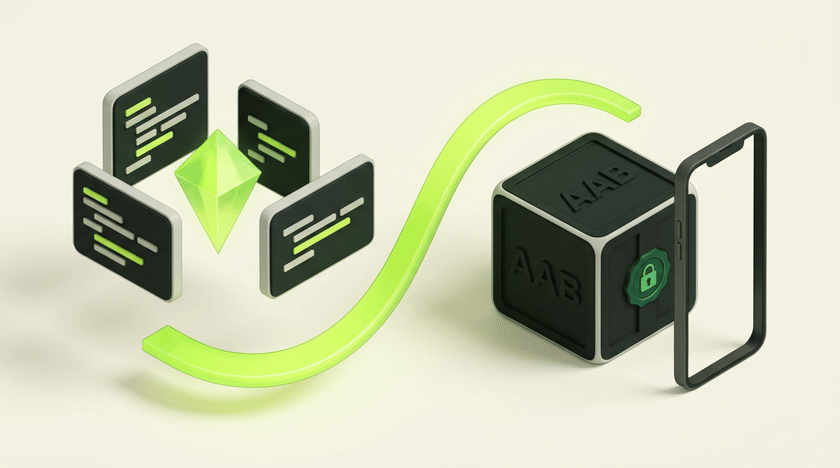
1. Why Google Play Rejects Thin Web Wrappers (While Approving Great Hybrid Apps)
Thousands of production apps on Google Play—built with Capacitor, Ionic, React, Vue, and Svelte—pass review every single week. When an indie developer receives a rejection citing **Spam and Minimum Functionality** or **Webviews and Affiliate Spam**, the root cause is almost never 'Google hates HTML/CSS'; it is that the uploaded `.aab` behaves like a bookmarked desktop webpage stuffed inside a ten-line `WebView.loadUrl("https://example.com")` Activity.
Google Play reviewers test two core questions: **First**, do you demonstrably own the web property and provide a cohesive, mobile-native user experience beyond a generic marketing website or affiliate link directory? **Second**, when network connectivity drops or the user swipes Android's system Back gesture, does your app behave like a real installed Android application—or does it dump raw Chromium error codes, open desktop footer navbars, and exit abruptly from deep screens?
| Architectural Dimension | High Rejection Risk (Thin Wrapper) | Play-Compliant Hybrid / Capacitor Build |
|---|---|---|
| Frontend Asset Delivery | Remote `loadUrl('https://...')` over network | Compiled `dist/` bundled locally inside `.aab` assets |
| Airplane Mode / Offline Test | Raw `net::ERR_INTERNET_DISCONNECTED` dinosaur | Branded offline UI + cached IndexedDB/SQLite state |
| Android Back Gesture | Immediately kills Activity from nested sub-pages | `App.addListener('backButton')` / `OnBackInvokedCallback` |
| External Legal / OAuth Links | Hijacks main WebView into trapped third-party site | Opens external domains in `androidx.browser` Custom Tabs |
| Mobile-Native Value | Desktop top-nav, tiny hover links, 'Coming Soon' tabs | Bottom tab bar, `env(safe-area-inset-*)`, haptics, notifications |
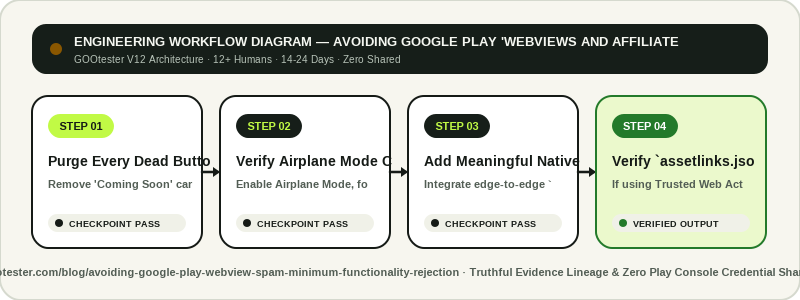
3. 4-Step Remediation Playbook If Your Hybrid App Was Rejected
If Play Console flagged your Closed Testing or Production submission for **Minimum Functionality**, **Broken Functionality**, or **Webviews and Affiliate Spam**, **do not** bump `versionCode` by 1 and resubmit the exact same UI hoping for a softer reviewer. Repeated identical submissions escalate single-app rejections toward account-level strikes.
Execute these four concrete engineering upgrades before uploading your next `.aab`.
- Purge Every Dead Button, Placeholder Tab & Desktop Header: Remove 'Coming Soon' cards, non-functional settings toggles, website cookie-banner popups, and desktop mega-footers; ensure every tappable element performs a complete action.
- Verify Airplane Mode Cold Start on a Physical Android Phone: Enable Airplane Mode, force-stop and cold-launch your release `.aab`: the app shell must render cleanly in under 2 seconds with cached local state or a styled offline retry view.
- Add Meaningful Native Android Platform Integration: Integrate edge-to-edge `WindowInsets` safe areas, native SplashScreen handoff, local reminders/notifications, native Share sheet, biometric lock, or offline local persistence.
- Verify `assetlinks.json` SHA-256 Parity (For TWA / App Links): If using Trusted Web Activity, confirm `https://example.com/.well-known/assetlinks.json` lists your cloud **Play App Signing** SHA-256 certificate so Chrome's URL bar never appears.
4. Validating Hybrid App Depth Across 14-Day Closed Testing
Passing initial policy review is half the battle; on Day 15, Personal Developer Accounts must also pass Google's **Production Access** evaluation. Thin single-purpose calculators, static text readers, or unpolished web wrappers struggle during Production review because human testers run out of anything meaningful to do after thirty seconds.
Build genuine multi-session utility (saved history, offline sync, customizable workflows), test across diverse Android System WebView versions with 12–25 consented human testers via `testers@gootester.com`, and use GOOtester's strictly separate ARM64 physical-device ADB QA ($12 Standard / $20 Premium) to verify cold-start speed and zero WebView renderer crashes. Remember that Google Play alone decides policy compliance and Production Access, and GOOtester's clock starts only after verified Play Console track setup.
- Disable accidental browser text-selection highlight (`user-select: none` on navbars/buttons) and `300ms` tap flashes so touch controls feel crisp.
- Respect Android 15/16 Edge-to-Edge system status and gesture navigation bars so bottom tab buttons never hide behind OS gesture pills.
- Open Privacy Policy and Terms links via `@capacitor/browser` (Chrome Custom Tabs) rather than replacing your app's root DOM.
- Ship at least one visible UX improvement `.aab` during your 14-day closed test based on real tester device feedback.
Actionable Pre-Submission Verification Checklist
- Remove any remote `server.url` from `capacitor.config.ts` so compiled frontend assets ship inside your `.aab`.
- Cold-launch your release `.aab` in Airplane Mode to confirm zero raw `ERR_INTERNET_DISCONNECTED` screens.
- Delete every 'Coming Soon' placeholder button, dead menu link, and desktop marketing footer.
- Wire Android hardware/predictive back navigation so nested views pop history instead of killing the app.
- Publish matching Play App Signing SHA-256 fingerprints in `/.well-known/assetlinks.json` for TWAs and App Links.
- Validate touch safe-areas and WebView performance on real OEM phones during your 14-day Closed Testing window.
Frequently Asked Questions
Are Capacitor and Ionic apps banned on Google Play under the Minimum Functionality policy?
Not at all. Capacitor and Ionic apps pass Google Play review routinely when they bundle compiled UI assets locally inside the `.aab`, handle offline states cleanly, respect Android navigation/insets, and deliver real interactive app functionality.
Why does my Trusted Web Activity (TWA) still show the Chrome URL address bar at the top?
A visible Chrome URL bar in a Play Store TWA means Digital Asset Links verification failed—almost always because `/.well-known/assetlinks.json` still lists your local debug/upload SHA-256 instead of Play Console's cloud App Signing SHA-256.
Can a simple 1-screen unit converter or static quote book pass Minimum Functionality in 2026–2027?
Static, single-screen brochure or trivial content apps face very high rejection rates under Google Play's expanded Spam and Minimum Functionality standard. Add persistent user data, customizable workflows, offline tools, and polished mobile UX before submitting.
How do I prove domain ownership if Google flags my hybrid app for Webview Spam?
Host `https://example.com/.well-known/assetlinks.json` referencing your exact `applicationId` and Play App Signing SHA-256 digest, match your Play Console Developer Website and support email (`support@example.com`) to that same domain, and bundle UI assets locally.